
Email signatures

Centrally managed email signatures for Microsoft 365

CodeTwo Email Signatures 365

What is CodeTwo Email Signatures 365?

CodeTwo Email Signatures 365 is a cloud service for managing company email signatures, branding and disclaimers across Microsoft 365. Your organisation creates and maintains signatures centrally, while employees’ details are filled in automatically. A new colleague, a revised job title or a refreshed campaign no longer needs a separate signature to be designed and copied into every mailbox.

It brings together the visual design of a signature, the rules that decide who receives it, and the way it is added to a message. This lets IT keep control of the setup while marketing manages the appearance and content. External correspondence can carry a complete branded signature, while internal messages and ongoing conversations use a simpler version.

One place to manage your brand

Consistent signatures across your organisation.

Manage templates and signature rules in a browser. Assign designs to particular teams or use a common company layout with each sender’s own contact information. Changes are managed centrally, so a new banner, address or disclaimer can be introduced without asking everyone to edit their personal settings.

Signatures can carry more than a name and telephone number: include a company logo, employee photo, social media buttons, a promotional banner or a meeting link. The same management process supports everyday branding and time-limited campaigns.
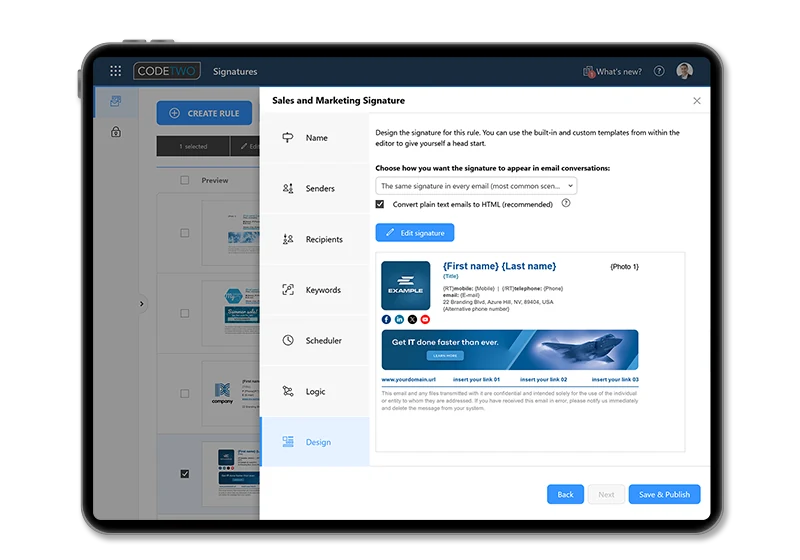
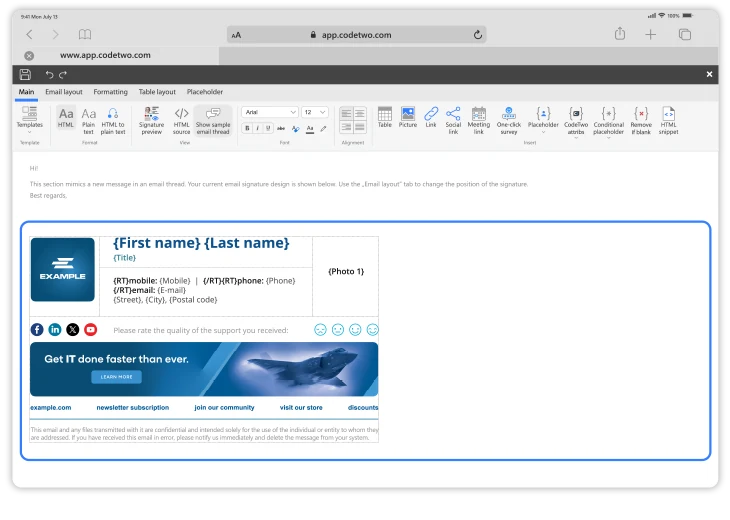
CodeTwo browser interface for managing a company email signature
How it works

Choose how signatures reach your messages.

Three operating modes let you match signature delivery to your email applications and mail-flow requirements. The mode determines whether the signature is inserted while a message is being written or after it has been sent.

Cloud mode

Added after sending

Microsoft 365 connectors route outgoing messages through the CodeTwo service on Microsoft Azure, where the applicable signature is inserted. This server-side approach works independently of the sender’s email application or device. An optional Outlook add-in provides a preview while composing.

Outlook mode

Visible while composing

The CodeTwo add-in inserts the signature directly in Outlook on Windows, Mac, the web, iOS and Android. Email does not need to pass through CodeTwo’s signature-processing servers in this mode, and mail-flow connectors are not required.

Combo mode

Both methods together

Combine the Outlook add-in with cloud processing. Users working in Outlook see their signature as they write, while messages sent from other email applications receive their signature after sending. This combines a visible authoring experience with coverage across other clients.

Design and personalisation

A shared design. The right details for each person.

The visual HTML editor provides a practical starting point for your brand: choose a template or build your own design, then add the elements you need. Dynamic placeholders bring names, job titles and contact details into the layout rather than creating a separate design for every employee.

Microsoft Entra ID supplies user information, including Microsoft 365 profile photos. Conditional content and missing-field handling help keep the layout tidy when a person has no mobile number or a particular department needs different information.

CodeTwo HTML signature editor with dynamic user placeholders

Why choose CodeTwo Email Signatures 365?

A signature service should support the people who maintain it as well as those who send email. CodeTwo combines central administration, flexible delivery and visual editing, with controls for sharing responsibility across teams.

Brand consistency

Keep layouts, campaign graphics and contact details aligned across your organisation, with different designs where a team or audience needs them.

Clear ownership

Delegate signature work to the people responsible for it. Marketing can maintain designs without being given broad Microsoft 365 administration rights.

A service you can assess

Review the product’s Microsoft 365 certification, CodeTwo’s ISO-certified management system and the published data-protection commitments in the Security tab.

Implementation with Nordma

From your brand guidelines to a working rollout.

We can help review your Microsoft 365 setup, choose an operating mode and turn your brand guidelines into signature templates. Together, we can define the sender groups, campaign rules and responsibilities, test representative messages, and prepare your team to manage the service.

Discuss your requirements

Using Exchange Server on-premises?

CodeTwo also offers Email Signatures On-prem for Exchange Server. If your mailboxes are hosted on-premises or your environment is hybrid, Nordma can help identify the appropriate product and deployment approach. The Microsoft 365 features described on this page should not be assumed to apply to the on-premises product.

Ask about Exchange Server
Features

Control the design. Personalise the message.

From a company-wide template to a campaign for a specific team, CodeTwo brings the main signature tasks into one service. Explore the design tools, targeting rules, directory integration and everyday email behaviour in detail.

Central management

The right signature for each sender and recipient.

Create signature rules for individual users, groups, aliases or people with matching directory attributes, such as department, country or job title. Apply different content to internal and external recipients, or target particular recipient addresses and domains. Conditions and exceptions let a shared design accommodate the way different teams communicate.

Rules can also react to keywords in a message’s subject or body. A configured keyword can select or suppress a signature, and trigger text can be removed during processing. This gives you options for exceptional messages without changing the normal signature for everyone.

Delegate work without handing over your tenant

Role-based access lets selected users or groups manage signature work without additional Microsoft 365 administrator privileges. Limit access to the relevant rules and distinguish design or viewing responsibilities from permission to create, edit and delete rules.

CodeTwo central signature management and rule configuration
Visual HTML editor

Build signatures that follow your brand.

Use a ready-made template or create a signature from the beginning in the browser-based visual editor. Adjust text, colours, spacing and layout, then add logos, promotional banners, social media buttons and disclaimers. The quick customisation tools make it possible to change common design elements without manually rebuilding the HTML.

Dynamic placeholders and conditional elements belong in the same template as your branding. For designs that require direct control, edit or import HTML. Server-side designs can also use content above or alongside a message, where appropriate for the communication.

Graphics embedded in the message

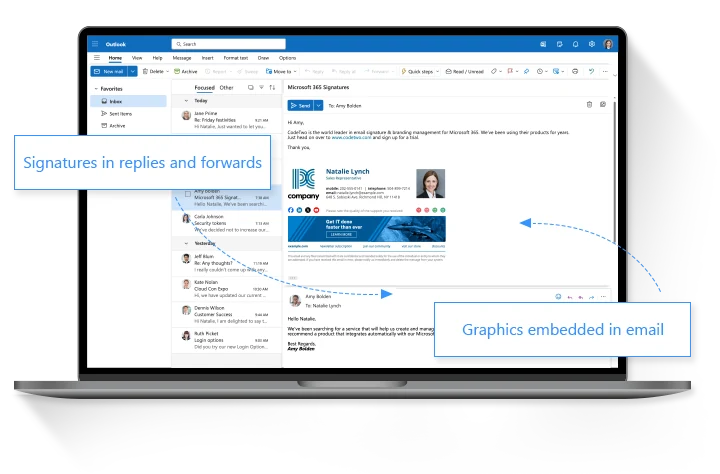
Embed signature images into the email rather than depending entirely on remotely hosted graphics. Logos and banners travel with the message, reducing reliance on a recipient downloading external pictures. The design should still be tested in the email applications your audience uses.

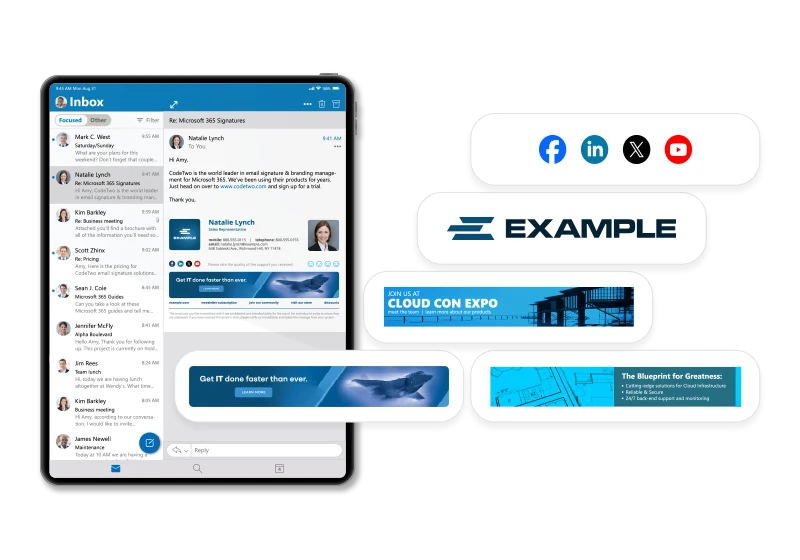
Company logos, promotional banners and social media buttons in CodeTwo signatures
Microsoft Entra ID

Personal details without individual templates.

Populate signatures with Microsoft Entra ID data, formerly Azure AD: names, job titles, departments, addresses, telephone numbers, email addresses and other supported attributes. Microsoft 365 user photos can be inserted alongside those details, helping recipients recognise the person behind the email.

CodeTwo synchronises directory information into its cache, normally on a 20-minute cycle. Custom attributes offer room for additional information, and the service also supports dedicated CodeTwo attributes and controlled user-data updates.

Keep incomplete profiles from breaking the design

Conditional placeholders can choose different content according to the sender’s details. Missing-field handling can remove an empty value together with its label or surrounding line, so someone without a mobile number does not send a signature containing an empty “Mobile” field.

Signature editor with placeholders for employee names and directory details
Email applications and devices

Consistent branding wherever people send email.

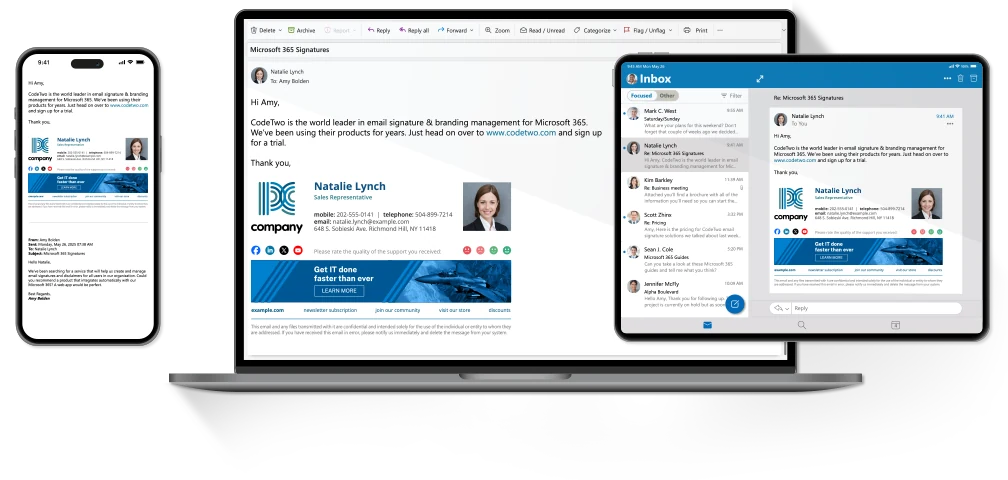
Cloud mode adds signatures after messages leave the sender, so it covers desktop mail applications, browser-based email and mobile devices without relying on a signature being installed in each client. This is useful when staff use several devices or applications across their working day.

For an in-message editing experience, Outlook mode inserts the signature while the email is being written. It supports Outlook on Windows, Mac, the web, iOS and Android through the CodeTwo add-in. Combo mode combines this Outlook experience with cloud delivery for other applications.

The operating mode is therefore part of the implementation decision. Nordma can help test your supported clients, shared-mailbox workflows and message types before a wider rollout.

CodeTwo signatures displayed on desktop, tablet and mobile email applications
Replies, forwards and sent messages

Keep conversations readable.

Place the signature immediately below the newest reply or forwarded message, rather than at the end of the entire conversation. Use a complete signature for an initial email and a shorter design for subsequent messages, so a long thread does not fill with repeated banners and contact blocks.

Conversation settings can add signatures to every message, add one only at the beginning, or remove earlier signatures when adding a new one. These options help balance brand visibility with the length of a continuing exchange.

See what was sent

With cloud mode, Sent Items Update can add the processed signature to the sender’s stored message. Users can inspect its placement and contact details after sending. The update runs separately from message delivery and does not require a service-account password. Outlook users can also use the applicable add-in experience to view their signature while composing.

Email conversation showing signature placement and embedded graphics
Campaigns and engagement

Make everyday email part of your marketing.

Add banners and campaign links to the signatures of the people speaking to your intended audience. Use rule conditions to choose the relevant senders and recipients, and add tracking parameters to links so campaign traffic can be assessed in your analytics tools.

The scheduler can start and stop a campaign at a defined date and time, or repeat it daily, weekly or monthly. Prepare seasonal offers and event invitations in advance, with different schedules for different rules. Rules without a schedule can continue to run normally.

Make the next action easy

Place meeting and booking links in signatures so recipients can arrange a conversation directly. The service also includes one-click customer-satisfaction surveys, extending the same management approach to feedback.

Campaign ownership can sit with marketing through delegated access, while IT retains responsibility for tenant configuration and the overall service setup.

Promotional banners and social links in a branded email signature
Included feature

Centrally managed automatic replies

CodeTwo Autoresponder lets you manage branded automatic replies and out-of-office messages for selected users and teams. Add your logo, links and personalised signatures, and use schedules or message conditions to control when replies are sent—for example, to acknowledge a support enquiry or explain an employee’s absence.

Autoresponder is included in Email Signatures 365 at no additional feature charge. It works in cloud or combo mode; Nordma can help configure it alongside your email signatures.

Plan your email signatures
Security and compliance

Understand the assurances behind the service.

Email signatures interact with identity data and, in cloud mode, email processing. CodeTwo publishes product certifications, organisational certifications, privacy commitments and framework declarations to help customers assess that relationship. The scope matters: an independently assessed certification, a supplier declaration and a feature that supports your own compliance are different kinds of assurance.

The information below concerns CodeTwo and its stated service scope. It does not transfer a certification to Nordma or automatically establish your organisation’s compliance.

Certifications and independent assessments

Product certification

Microsoft 365 Certified

CodeTwo Email Signatures 365 and its Outlook add-in have completed Microsoft’s certification process. The assessment covers application security, operational security and data handling, including review and penetration testing of the application and its supporting infrastructure.

The programme draws on controls from ISO 27001, SOC 2 and PCI DSS. Those references describe the Microsoft assessment criteria; they are not evidence of a separate CodeTwo SOC 2 report.

Organisational certification

ISO/IEC 27001

CodeTwo’s Information Security Management System is certified by BSI under certificate IS 764207. Its scope is the organisation’s management of information security, including the processes used to identify risks, apply controls and review their effectiveness.

It is an assurance about a managed security system, supported by audits and ongoing improvement, rather than a promise that every possible risk is eliminated.

Cloud privacy certification

ISO/IEC 27018

BSI certificate PII 764209 covers CodeTwo’s management system against requirements for protecting personally identifiable information in public-cloud processing. It complements the information-security management framework with a specific focus on personal data.

This is relevant when reviewing how employee details and other personal information are handled as part of the service.

Organisational certification

Cyber Essentials

CodeTwo lists Cyber Essentials certification in its Trust Center. This adds an organisational cybersecurity assurance to the product and information-security certifications described here.

The published designation is Cyber Essentials. It should not be described as Cyber Essentials Plus, which is a different level of assessment.

Scoped compliance validation

PCI DSS

CodeTwo publishes SecurityMetrics PCI DSS compliance certificates for its ordering service, signature-management service and sign-in service. The listed scope covers orders.codetwo.com, emailsignatures365.codetwo.com and login.codetwo.com.

This scoped validation should not be interpreted as permission to send payment-card information by ordinary email, or as certification of a customer’s complete payment environment.

External security rating

SecurityScorecard — A rating

CodeTwo publishes an A rating from SecurityScorecard in its Trust Center. A security rating offers an external view of the organisation’s assessed security posture.

It is a rating rather than an ISO-style certification or audit report, and can change over time. Current evidence can be included in your supplier review.

Privacy and regulatory commitments

These commitments concern data handling and contractual obligations. They should be reviewed alongside the proposed operating mode, the processing agreement and your organisation’s requirements.

Privacy compliance programme

GDPR

CodeTwo describes a GDPR programme covering data minimisation, retention, internal controls, staff training, data-subject rights and international transfers. A designated Data Protection Officer coordinates the programme, and CodeTwo reports an annual external GDPR compliance audit.

The Data Processing Agreement sets out the processor relationship and supporting measures. Audit summaries are available subject to the supplier’s terms. GDPR compliance is presented as an ongoing programme and contractual commitment, not as a standalone product certificate.

Contractual privacy commitments

U.S. state privacy laws

CodeTwo’s Data Processing Agreement addresses the California Consumer Privacy Act, Virginia Consumer Data Protection Act, Colorado Privacy Act, Connecticut Data Privacy Act, Utah Consumer Privacy Act, Oregon Consumer Privacy Act, Texas Data Privacy and Security Act, and Montana Consumer Privacy Act.

The agreement also addresses other applicable state privacy requirements within its terms. These provisions govern the supplier’s processing role and assistance obligations; applicability depends on the customer’s processing activities and the relevant law.

Compliance commitment and agreement

HIPAA

CodeTwo states that it has implemented safeguards and processes for HIPAA-related requirements and makes a Business Associate Agreement available on request. Organisations handling protected health information can review that agreement and the service’s role before deployment.

This is a compliance commitment supported by contractual arrangements. It is not described here as a government-issued HIPAA certification.

Organisational policies

Business ethics and responsible processing

CodeTwo includes business ethics in its Trust Center alongside security and privacy. Its published controls also address supplier assessment, least-privilege access, employee training, incident response and continuity planning.

These organisational practices complement the formal certifications. They are policies and operational commitments, rather than additional product certificates.

Additional standards and frameworks

CodeTwo’s Microsoft application attestation and Trust Center name the following standards and regulatory frameworks. Each entry below identifies the type of statement being made.

Standard or frameworkStatus and scope
ISO/IEC 27002CodeTwo declares compliance in its Microsoft application attestation. This refers to information-security control guidance; it is separate from the BSI certificates listed above.
NIST SP 800-171Supplier-declared compliance in the Microsoft application attestation. Assess the published declaration against your required service scope and evidence needs.
FERPACodeTwo answers positively to FERPA compliance in its Microsoft attestation. This is a supplier statement relevant to educational organisations, not an independent FERPA product certificate.
Sarbanes–Oxley Act (SOX)Supplier-declared compliance in the Microsoft attestation. It does not certify the financial controls or reporting processes of an organisation using the product.
ISO/IEC 27005:2022The Trust Center references this standard in CodeTwo’s risk-management processes. It is a process framework, not an additional certification listed for the product.
OWASP Top 10CodeTwo references OWASP guidance in secure development, including the Top 10:2025 in its Trust Center. This describes development practices rather than an OWASP-issued certificate.
WCAG 2.2 Level AACodeTwo states that its editor can be used to create compliant signature templates. Accessibility depends on the resulting template; this is not a claim that every signature or the entire application is independently certified.
SOC 2SOC 2 controls are referenced in Microsoft 365 certification. CodeTwo’s Microsoft attestation does not claim a separate SOC 1, SOC 2 or SOC 3 report.

How the service protects your information

Processing and storage

Cloud-mode signature processing runs on Microsoft Azure in the region selected for the service. CodeTwo states that message contents are not retained or logged as an email archive. Directory attributes, configuration and other service data are handled separately under the processing agreement.

Authentication and transport

Microsoft authentication uses OAuth 2.0 rather than storing administrator passwords. The service supports MFA and uses encrypted transport. Cloud mail flow is authenticated between the tenant and the service; Outlook mode adds signatures without routing messages through the cloud signature-processing pipeline.

Availability and operations

CodeTwo describes redundant infrastructure, failover arrangements and continuous monitoring. Access controls, security reviews and continuity planning support service operation. Any availability or support commitments for your purchase should be checked against the applicable agreement.

Disclaimers that support your own obligations

Central rules can distribute approved registration details, privacy notices, licence identifiers and unsubscribe information. CodeTwo describes applications relating to GDPR, HIPAA, the EU AI Act, Directive (EU) 2017/1132, the UK Companies Act 2006 and the Company, Limited Liability Partnership and Business (Names and Trading Disclosures) Regulations 2015.

Its examples also cover California’s Business and Professions Code and Consumer Privacy Act, Virginia Administrative Code, the U.S. SAFE Act, Canada’s Anti-Spam Legislation (CASL) and Australia’s Spam Act 2003. These are examples of supporting disclosure requirements, not additional certifications. Your organisation determines which rules apply and approves the actual wording; adding a disclaimer alone does not fulfil all obligations under these laws.

Need evidence for your security review?

Tell Nordma which certificates, contractual documents and technical controls your review requires. We can help coordinate the relevant supplier information and clarify the proposed deployment. Some detailed security documents may be subject to confidentiality terms.

Discuss security requirements
FAQ

Planning your signature rollout.

Answers to common questions about deployment, daily use and the choice between Microsoft 365 and Exchange Server.

Do employees need to install and maintain their own signatures?

Templates and rules are managed centrally. Cloud mode adds signatures after sending and does not require individual client-side signatures. Outlook mode uses a centrally deployed CodeTwo add-in to insert the signature while a message is being composed. The appropriate method depends on your applications and mail-flow requirements.

Will signatures work on phones and in applications other than Outlook?

Yes, cloud processing works independently of the sender’s email application or device. Outlook mode is specifically for supported Outlook clients, including Windows, Mac, web, iOS and Android. Combo mode combines the Outlook experience with cloud processing for other clients.

Can marketing maintain signatures without Microsoft 365 administrator access?

Yes. Signature management can be delegated to selected users or groups, with responsibilities restricted to the appropriate rules and actions. The tenant setup can remain with IT while marketing maintains templates and campaign content.

What happens if a user has no mobile number or another field is missing?

Templates can remove missing values together with the surrounding label or line. Conditional placeholders provide different content where needed. This keeps one shared design usable across employees with different profile information.

Can we use a shorter signature in replies and forwards?

Yes. Configure a different design for later messages in a conversation and place it below the latest reply. Conversation settings also control whether previous signatures remain, helping keep long threads readable.

Can we keep our existing design and make it accessible?

Templates can be created visually or imported and edited as HTML. CodeTwo states that the editor supports creating WCAG 2.2 Level AA-compliant signatures. Your final layout, image alternatives and content still need review and testing.

Is the Exchange Server version the same product?

No. Email Signatures 365 is the cloud service described here. CodeTwo offers Email Signatures On-prem for Exchange Server as a separate product. Tell us where your mailboxes are hosted, including any hybrid setup, so we can help choose the appropriate approach.

Can we evaluate the service before purchasing?

CodeTwo offers a 14-day trial. Nordma can help define a pilot with representative users, applications and signature designs so you can review the experience before deciding on a wider rollout.

Pricing enquiry

Licensing matched to your organisation.

CodeTwo Email Signatures 365 is licensed by user, with monthly or annual subscriptions and volume-based pricing. The minimum purchase is 10 licences. The subscription includes the product’s features, updates and supplier support, with unlimited signature templates.

Users and mailboxes

Tell us how many users and shared mailboxes need signatures. Licence consumption depends on the mode: cloud licensing follows mailboxes routed through the service, while Outlook licensing follows add-in users. We will confirm the appropriate count for your setup.

Implementation

Specify the templates, directory fields, departments, campaigns and email applications you need. Nordma’s proposal can identify configuration, design work, testing and handover separately from the software subscription.

Ongoing management

Decide who will update designs and campaigns after launch. We can scope training and any ongoing assistance alongside the licence term, so responsibilities and recurring services are clear.

Start with a trial or a pricing enquiry.

Share your approximate user count, Microsoft 365 setup and signature requirements. We can help plan an evaluation and prepare a quotation with the licence quantity, billing term and implementation scope clearly set out.

Request pricing