
Migration to
Microsoft 365

Move your mailboxes with a clear plan and a controlled transition.

CodeTwo Office 365 Migration

A planned move to Microsoft 365.

CodeTwo Office 365 Migration is a desktop application for moving mailbox data to Microsoft 365. It supports migrations from Exchange Server, hosted Exchange, another Microsoft 365 tenant and IMAP email services. Administrators configure connections and migration jobs through a graphical interface, then monitor the transfer as it progresses.

Nordma helps turn that capability into a migration plan: what needs to move, which accounts belong together, how users will switch to the destination and what must be checked before the old environment is retired. The software handles the mailbox transfer; the project also needs decisions about identities, domains, access and the user experience.

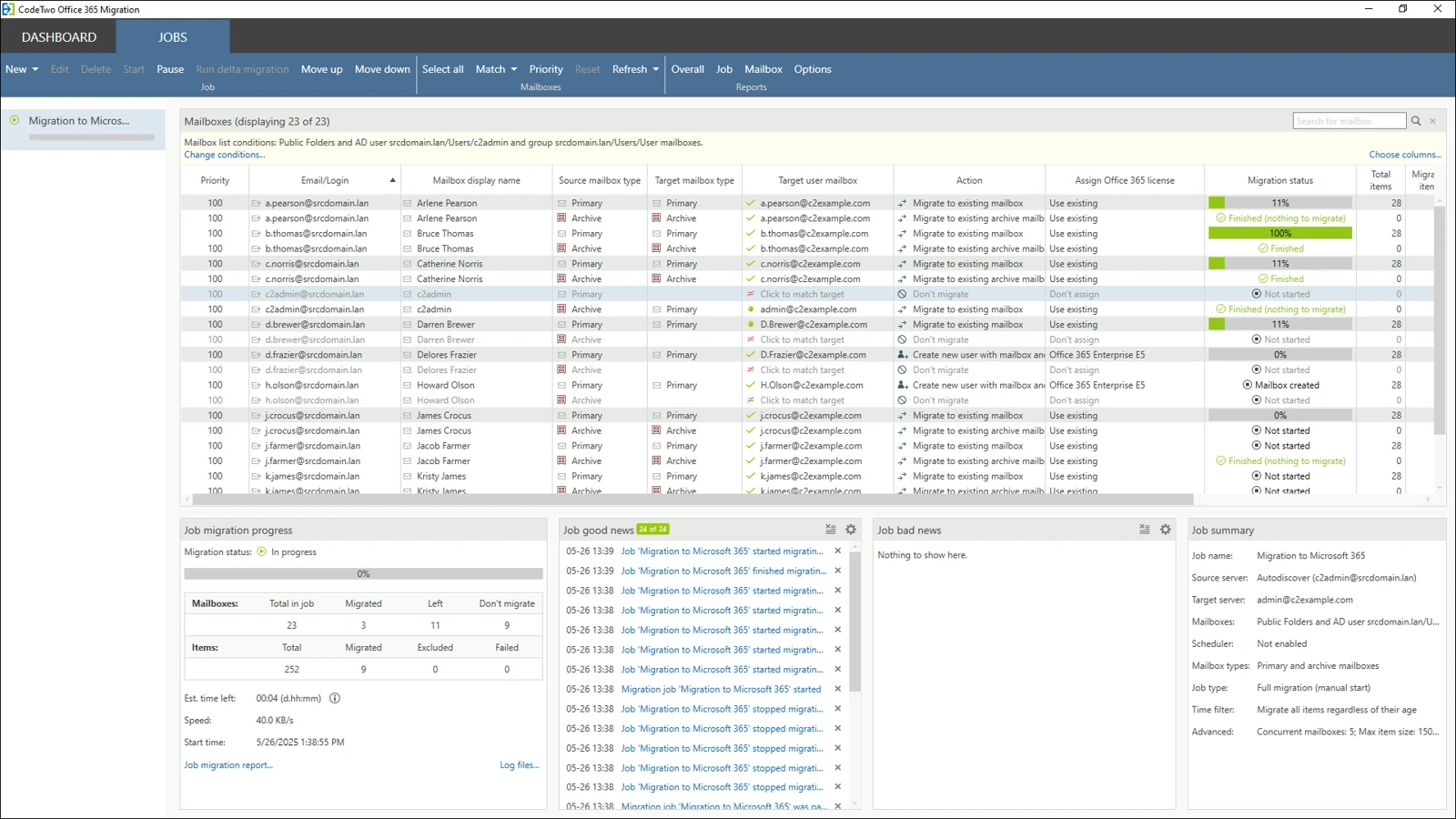
One place to oversee the transfer.

The dashboard brings migration jobs, connection information and notifications together. It gives administrators a starting point for checking progress and identifying jobs that need attention.

Before copying the full estate, we recommend a representative pilot. Include a large mailbox, a shared mailbox and any archive or public-folder requirements in the test scope. Review the resulting data with the people who use it, then use the findings to refine the wider migration.
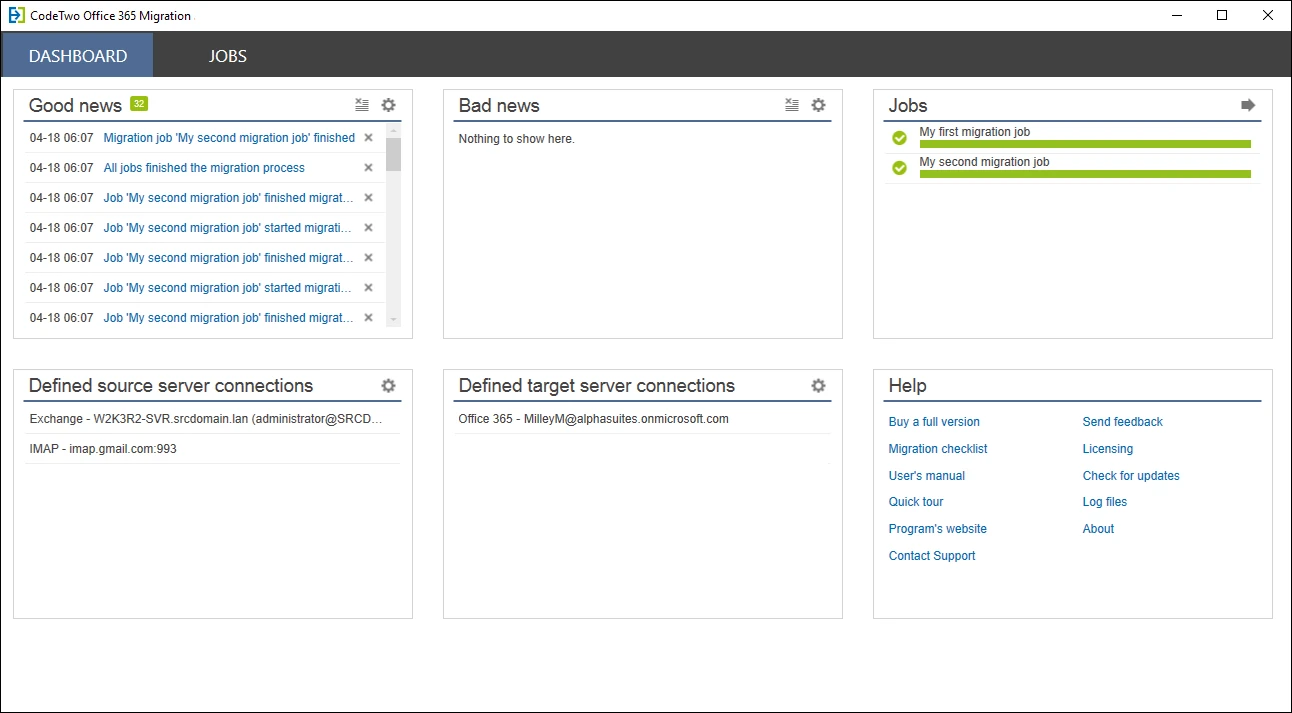
CodeTwo migration dashboard showing jobs, connections and notifications

From discovery to handover.

A migration is easier to manage when each stage has a clear owner and an agreed outcome.

Understand the source

Inventory mailboxes, volumes, archives and shared resources. Identify dependencies such as applications that send mail, delegated access and devices that need reconfiguration. Agree what belongs in the project before scheduling the move.

Prepare and test

Confirm destination accounts, permissions and connectivity. Test selected mailboxes and agree how to validate the results. A pilot is also an opportunity to prepare user instructions and establish a realistic transfer window.

Copy and transition

Run the agreed batches, review exceptions and coordinate the change to the destination. Mail routing, account sign-in and client configuration need their own cutover steps alongside the data transfer.

Verify and hand over

Check migration reports and representative mailbox contents, resolve outstanding issues and confirm user access. Agree a retention period for the source and a clear approval process before decommissioning it.

Moving to Exchange Server instead?

CodeTwo Exchange Migration supports migrations to Exchange Server. We can scope that destination separately while keeping the same emphasis on preparation, testing and a controlled transition.

Start with your current environment.

Tell us where your mail is hosted, approximately how many mailboxes you have and when you want to move. We can help identify the next practical steps.

Plan your migration
Supported scenarios

Different starting points. One destination.

The source system determines the connection method and the information available to migrate. Confirm the source version and required data types before choosing the migration approach.

Exchange Server to Microsoft 365

Move from an on-premises Exchange environment to Exchange Online. Plan for primary mailboxes and any archive or public-folder requirements, then validate permissions and source connectivity before the pilot.

Microsoft 365 to Microsoft 365

Transfer mailboxes between tenants, for example during a merger or separation. Domain ownership, identity changes and the timing of the tenant transition require coordination alongside the mailbox copy.

Hosted Exchange to Microsoft 365

Migrate from a hosted Exchange service. The available administrative access and the hosting provider’s connection settings need to be checked early, so access limitations do not emerge during the transfer window.

IMAP email to Microsoft 365

Copy email from an IMAP-compatible service, including supported configurations of Google Workspace, Zimbra or Kerio. IMAP is an email migration route: contacts, calendars and other workloads need a separate plan.

Check the connection before the schedule.

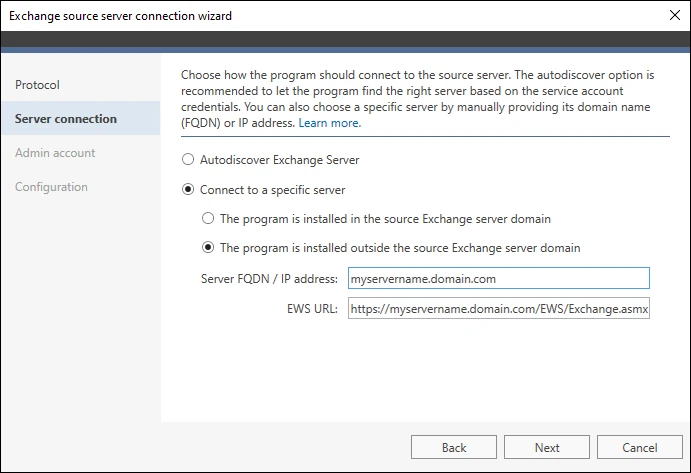
The connection wizard configures access to the source environment. A successful connection is one part of readiness: the pilot should also confirm that the expected mailboxes and data can be accessed.

For a hosted service, clarify responsibilities with the provider. For a tenant move, agree who controls each tenant, the domains and the destination accounts. Keep these dependencies visible in the project plan.

CodeTwo source Exchange connection wizard

Define the complete project boundary.

This page focuses on mailbox migration. If your move also includes Teams, SharePoint, OneDrive, device management or application changes, include those requirements in the enquiry so they can be assessed as separate workstreams.

Exchange Server destinations are also supported through CodeTwo Exchange Migration. Tell us your intended destination and source environment so we can confirm the appropriate product and scenario.

Discuss your scenario
Features

Control the scope. Follow the progress.

Configure who and what should move, organise the transfer into manageable jobs and review the results before completing the transition.

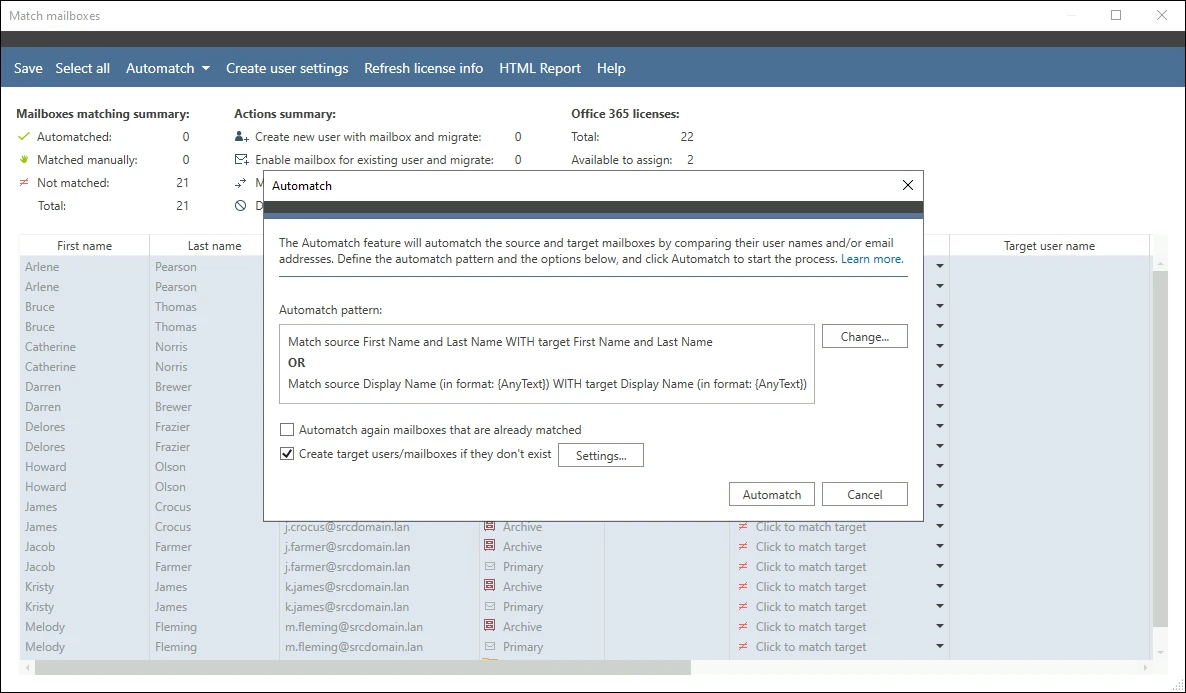
Match source and destination mailboxes.

Mailbox matching connects each source mailbox to its intended destination. Target account creation is also available for supported workflows.

Review the mapping before running a job, particularly where names or domains change. Use the pilot to confirm that shared resources and exceptional accounts are mapped deliberately, rather than relying on naming conventions alone.

CodeTwo source and target mailbox matching interface

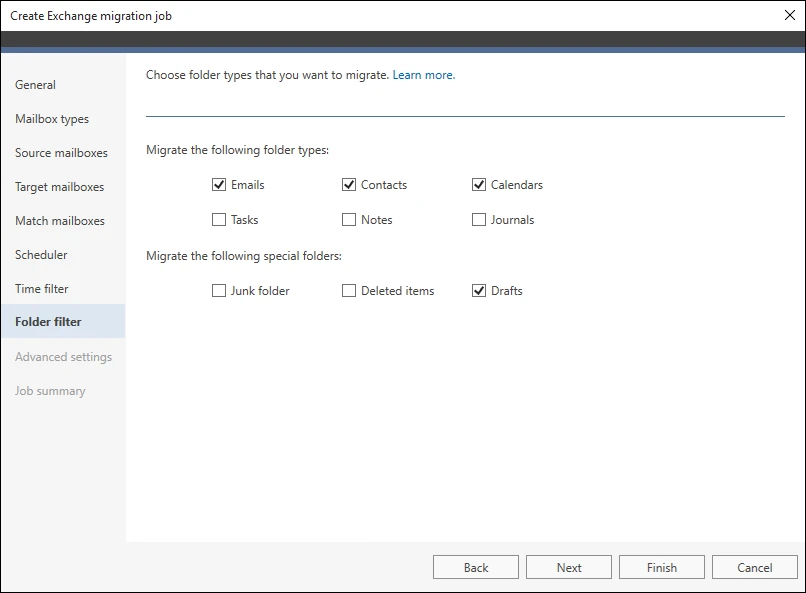
Select the data that belongs in the move.

Folder and date filters let administrators narrow a migration job. Exchange-based migrations can include email, contacts, calendars, tasks, notes and journals; IMAP transfers are limited to email.

Agree the scope with the business before applying exclusions. A date-based selection may suit a particular migration stage, but it should not accidentally become a decision about how much history the organisation retains.

CodeTwo migration folder-type selection

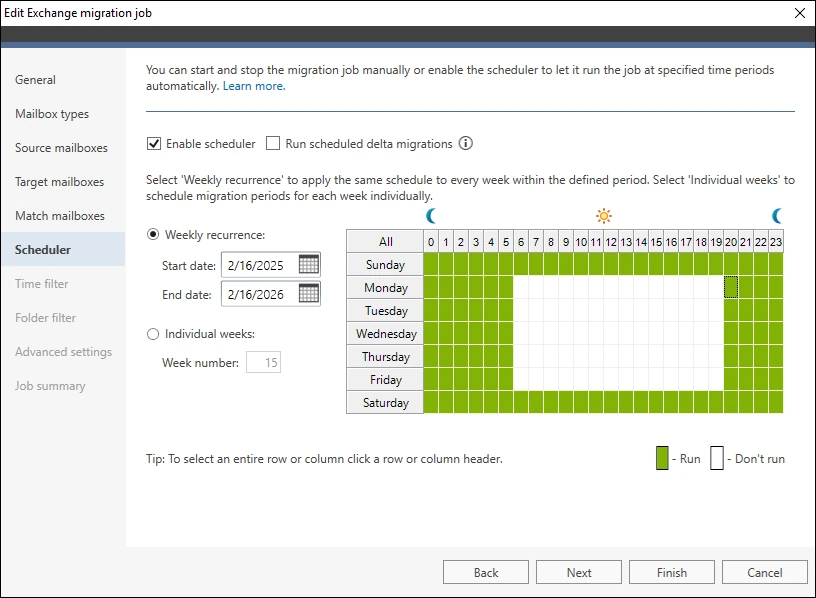
Schedule work around your transition.

Scheduling controls let jobs run within chosen time windows. Use staged batches to organise the transfer around your operational needs.

Allow time to review each stage. Mailbox size, available bandwidth and service limits all affect the practical schedule, so use pilot measurements to inform the plan rather than promising a fixed transfer rate.

CodeTwo migration scheduler with permitted time windows

Follow each job and collect new items.

The job view shows mailbox-level progress. Delta migration can copy new items after an earlier pass while skipping items already transferred.

That supports a staged approach, but it is not a two-way synchronisation service. Plan a final transfer and validation step around the agreed cutover, including how remaining source activity will be handled.

CodeTwo migration job showing mailbox progress and processing details

Use reports to guide verification.

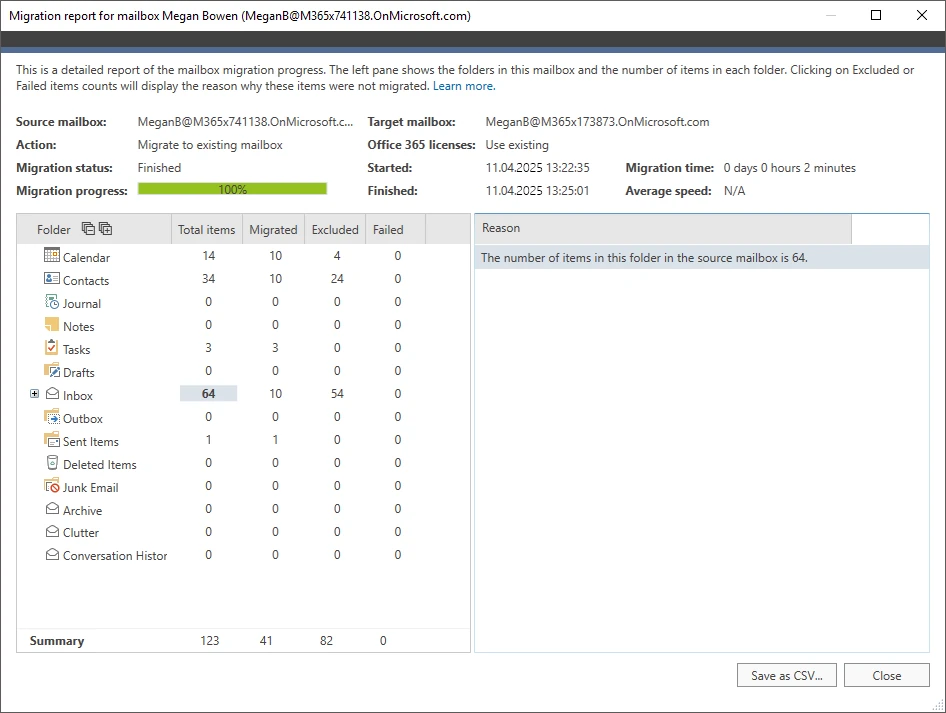
Migration reports provide detail about processing outcomes. Review failures and exceptions, investigate their causes and keep the results with the project handover.

A completed transfer report and a successful user experience are related checks. Confirm that representative users can sign in, find the expected information and perform their everyday tasks before accepting the migration as complete.

CodeTwo migration report with mailbox and folder statistics

Keep the transfer under your control.

The application runs in your chosen environment and transfers data directly between source and destination without an additional CodeTwo cloud relay. Microsoft 365 authentication uses OAuth 2.0. The migration copies source items without deleting them.

Define administrative access, the machine running the application and responsibility for local logs as part of preparation. Nordma can help review those requirements alongside the migration scope.

FAQ

Before you move your mailboxes.

Can people keep using email during the migration?

Users can continue using the source while data is copied. The final switch still needs coordination: mail routing, sign-in and client configuration may affect access. We agree a cutover plan and user communications rather than treating the copy operation as the entire transition.

Does a second pass synchronise every change?

No. Delta migration imports new items and skips those already copied. It is not continuous, two-way synchronisation of edits and deletions.

Can we migrate archive mailboxes and public folders?

Yes, with the relevant source and destination prerequisites. Target archives must be enabled, and public folders need the required preparation and permissions. Include both in the initial scope.

Does IMAP also transfer calendars and contacts?

No. IMAP copies email and its folders. Calendars, contacts and other information require a separate migration approach.

What happens to encrypted messages?

They remain encrypted after copying. Check that destination users have the rights and means to open them; transferring a message does not remove its protection.

How long will the migration take?

There is no useful universal duration. We assess mailbox count and size, connectivity, source access and the destination’s service limits. A pilot provides evidence for scheduling batches, while the cutover plan accounts for identity, domain and client changes.

Will the source data be deleted?

The migration copies data; it does not delete source items. Retirement of the old environment should be a separate decision after validation and agreement on retention requirements.

Can we evaluate the software first?

A 30-day trial is available, limited to 10 items per folder. It is useful for checking the workflow, but a full-volume transfer requires suitable licensing.

Pricing enquiry

Licensing that matches your migration scope.

CodeTwo Office 365 Migration uses a one-off software licence rather than a recurring subscription. The required licence pool is based on the source mailboxes and any public-folder migration.

ItemLicensing basis
Minimum purchase10 mailbox licences.
Source mailboxOne licence per source mailbox.
Primary mailbox and archiveA source Exchange primary mailbox and its archive use one licence together.
Shared mailboxOne licence per shared mailbox.
Public foldersA public-folder database, including its subfolders, consumes 100 mailbox licences.

Separate the software from the project work.

A useful proposal makes both costs visible. The software licence covers the migration tool; preparation, configuration, cutover assistance and validation should reflect the work your organisation needs.

Tell us what needs to move

Include the source platform, number of primary and shared mailboxes, approximate data volume, archives and public folders. Mention any deadline, tenant consolidation or domain changes.

Agree the level of assistance

Choose the help you need with discovery, pilot testing, migration batches, user communications and handover. We can scope those activities and their responsibilities in the proposal.

Request a migration proposal.

We will help confirm the scenario, licence requirements and implementation scope before you commit to the move.

Request migration pricing