
One-click surveys

Turn everyday Microsoft 365 emails into customer feedback.

CodeTwo One-click surveys

What are one-click surveys?

CodeTwo One-click surveys adds a simple rating request to Microsoft 365 email. Customers can respond to a message by selecting a rating icon, giving your team a direct way to hear about their experience. Feedback becomes part of the correspondence you already have, rather than another separate questionnaire to send and manage.

The feature is included in CodeTwo Email Signatures 365. It combines customisable surveys with CodeTwo Insights, where ratings and comments help you understand how customers experience your people, products and services.

Feedback in everyday email

Make it easy for customers to tell you.

A short question and a recognisable rating scale can fit naturally beneath a helpful reply or a completed service request. The customer does not have to compose a separate message to register an opinion, and your team gets a consistent starting point for reviewing the experience.

The question should describe the interaction you want to understand. Asking about today’s support is different from asking about a product or an ongoing relationship. Keeping that distinction clear makes the response easier to interpret and the next action easier to decide.
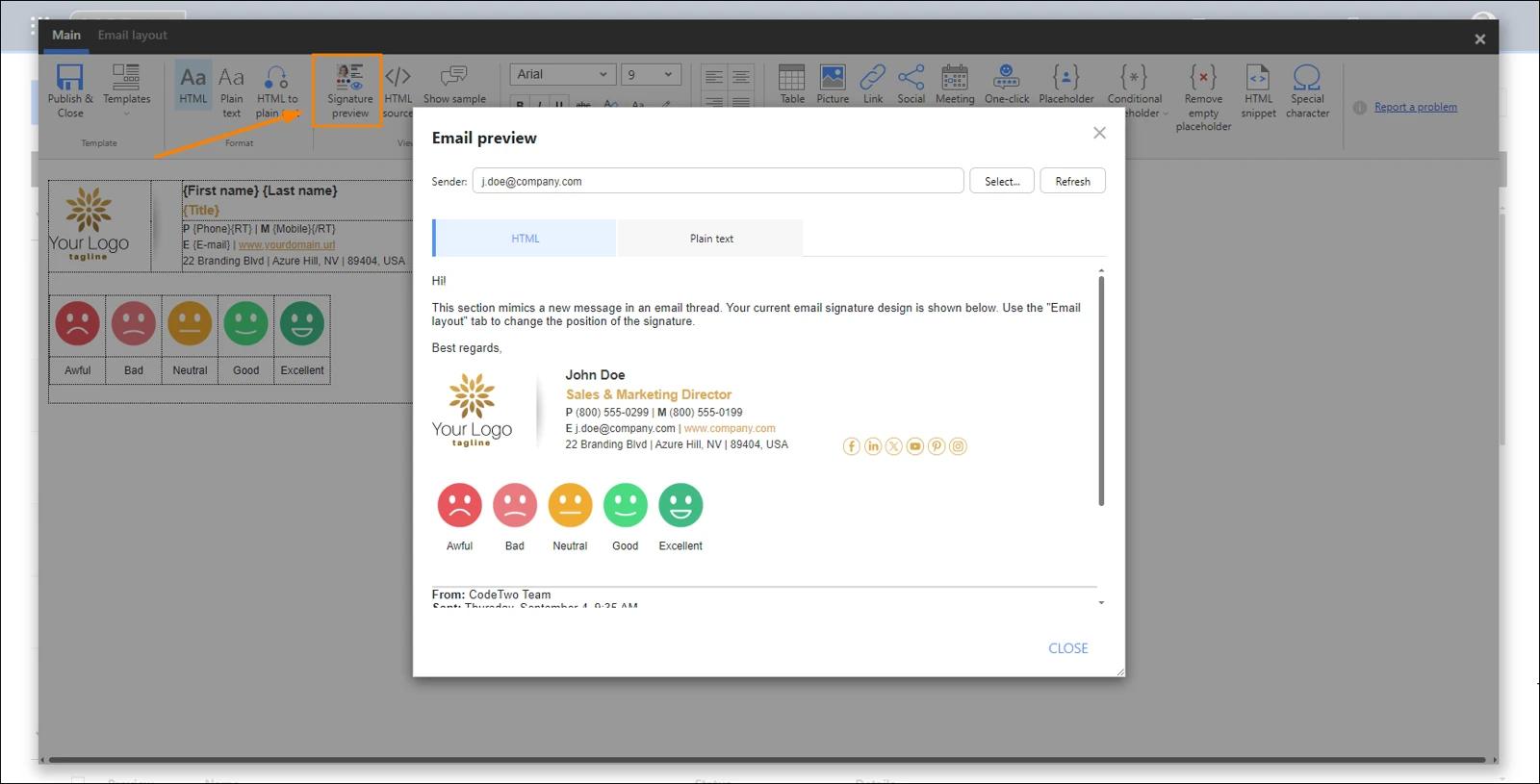
Preview of a CodeTwo rating survey beneath an email signature

From a quick response to a useful conversation.

A feedback process works best when someone owns the response. Decide what you are asking, when the request belongs in the conversation, and who will review the results.

Ask

Choose the moment

Use a focused question that relates to the exchange. A support resolution, an onboarding follow-up or a product discussion each gives the customer a different experience to assess.

Listen

Leave room for context

A rating highlights a reaction. A comment can explain it. Read the two together before deciding whether the customer needs a follow-up or the underlying process needs attention.

Improve

Close the loop

Assign responsibility for reviewing feedback and agree how your team will respond. Use recurring themes to inform improvements, then review whether the experience changes.

Customer satisfaction

Understand the pattern behind the score.

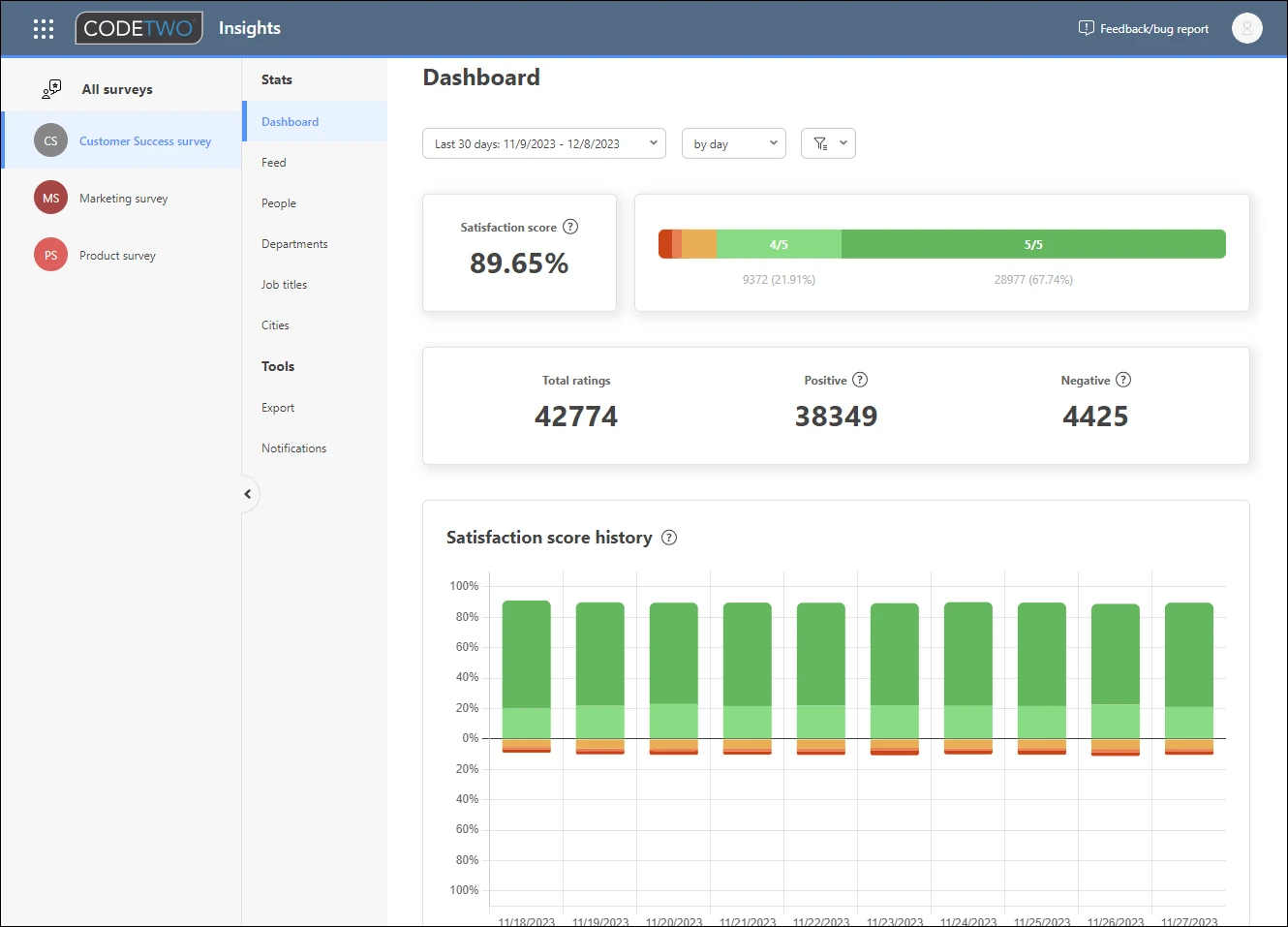
Customer satisfaction, or CSAT, expresses positive responses as a share of the ratings received. It is useful for tracking an experience over time, especially when the question and measurement period remain consistent. It is not the same measure as a recommendation score such as NPS.

CodeTwo Insights brings feedback into a dashboard. Compare trends with changes in your service, and consider the volume of responses alongside the score. A percentage based on a handful of replies deserves a different interpretation from one based on a sustained pattern.

Use comments to understand what happened rather than treating a number as a complete explanation. Positive responses can reveal what customers value; neutral and negative responses can identify where a follow-up or a process review would help.

CodeTwo Insights dashboard with satisfaction score, rating totals and history

Where can your team use surveys?

Start with a clearly defined experience. The same collection method can serve different teams, but each team needs a question and a review process suited to its work.

Customer support

Review the service experience

Ask how a customer experienced the help they received. Use the response as an input to service reviews and a prompt to investigate unresolved frustration. Keep the customer’s issue and the complexity of the case in view when discussing the result.

Sales and customer relations

Listen after the conversation

Use feedback after a demonstration, onboarding exchange or account discussion. A useful question focuses on that interaction, helping the team understand whether the customer’s expectations were met and whether another conversation is needed.

Product and service teams

Hear about actual use

Gather a response after someone has had an opportunity to use the product or service. Consider feedback alongside support issues and other research when deciding what to improve, rather than treating one rating as a complete product requirement.

Human resources

Review internal experiences

Use a specific question about an internal service or initiative. Explain the purpose and who will review the responses before introducing employee feedback, so participants understand how the information will be used.

Build the process around the feedback you need.

Nordma can help select a first use case, prepare the survey, configure the email rules and agree who will review the results. A focused pilot gives your team a chance to evaluate the experience before expanding it.

Plan your survey rollout
Features

Ask clearly. Review feedback. Take action.

Survey design, email delivery and reporting belong to the same workflow. Configure the customer-facing experience and the way your team receives and reviews the results.

Survey design

A rating scale that fits your question.

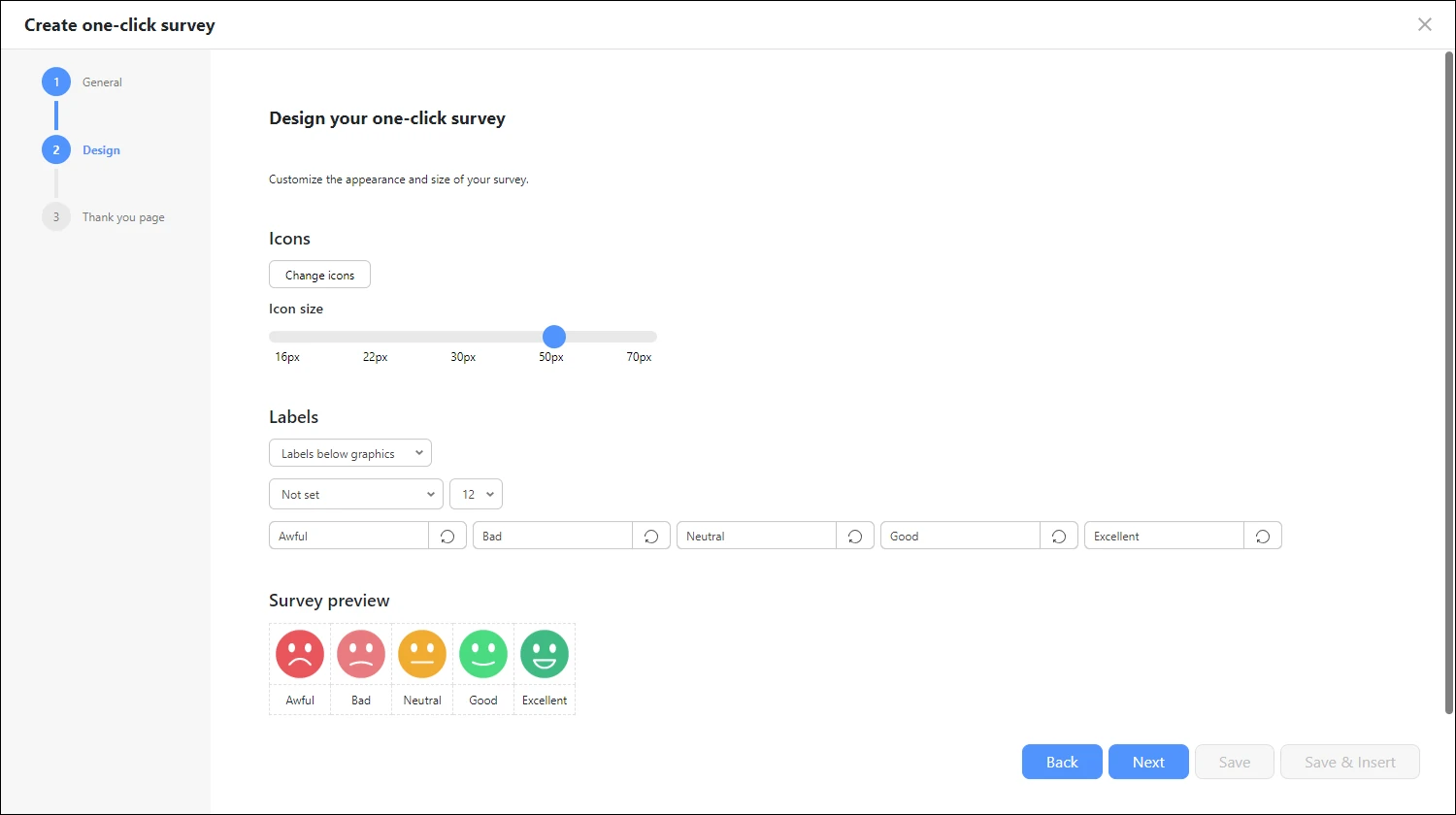
Choose rating icons such as faces, stars or thumbs, and customise the labels and appearance. Survey content can sit within a signature or be managed through a separate rule.

Keep the question short enough to understand in the context of an email. Labels should make the meaning of each rating clear. Match the visual style to your signature, while leaving enough contrast and spacing for recipients to recognise the choices on a smaller screen.

Before launch, review the scale with the team that will interpret the results. A shared understanding of what the survey asks makes later comparisons more useful.

CodeTwo survey designer with rating icons, labels and size controls
Recipient experience

A thank-you page with space to explain.

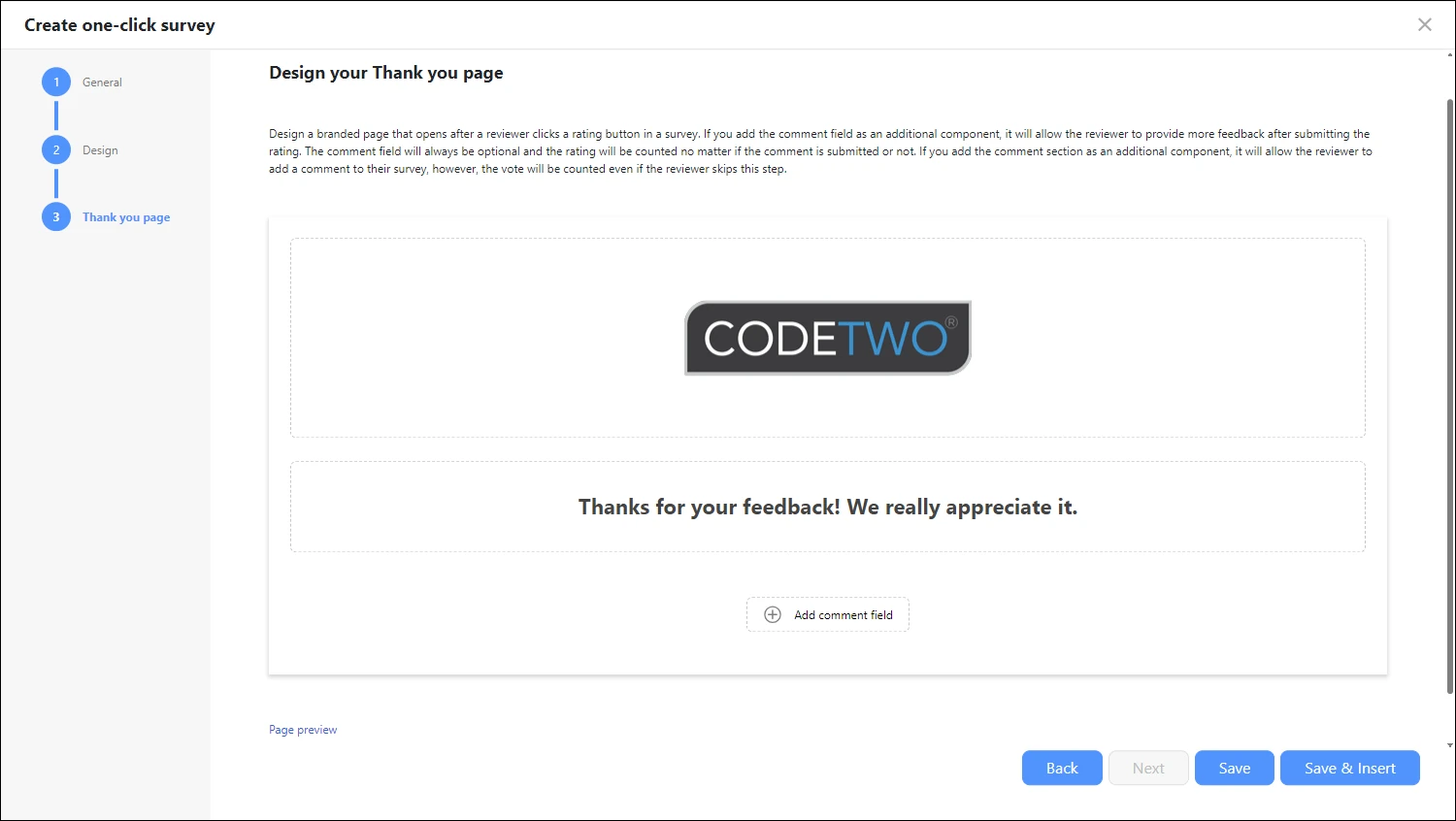
After a rating is selected, a thank-you page opens. Add your branding and enable an optional comment field.

The acknowledgement is part of the experience. Thank the person for their time and use clear wording about the purpose of any additional comment. A brief explanation can be particularly useful when the rating alone does not show what went well or what needs attention.

We can help align the email question and the follow-up page, so the experience feels like one conversation.

CodeTwo editor for the survey thank-you page and optional comment field

Control when surveys appear.

CodeTwo’s signature rules provide the delivery controls. Plan the survey around your existing correspondence, with a clear distinction between automatic insertion and a sender choosing a survey-bearing signature.

Choose the audience

Use sender and recipient conditions to select the relevant users, groups or destinations. Different teams can have different rules, so a support question does not need to appear in every department’s correspondence.

Choose the trigger

In cloud mode, keywords in a message can control whether a rule applies. This can support a deliberate feedback request at a chosen point in the conversation, rather than adding the same survey to every exchange.

Choose the delivery mode

Cloud rules insert content after sending across email apps and devices. Outlook rules use the CodeTwo add-in while composing. We can help check the appropriate mode and its reporting implications during setup.

CodeTwo Insights

Look beyond the overall percentage.

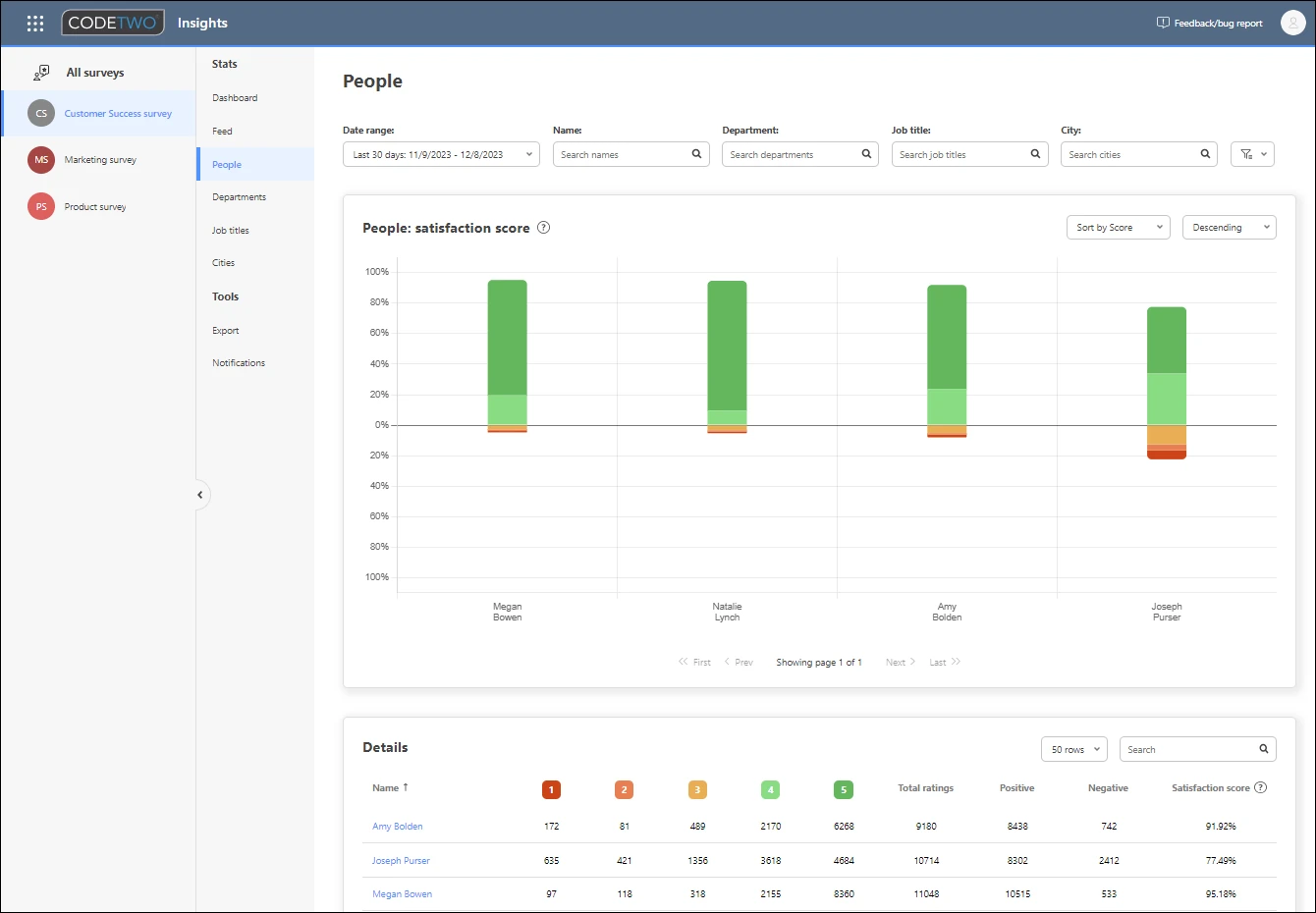
Review satisfaction trends and compare feedback across people and departments. Keep the reporting period consistent when evaluating change, and read the results in the context of the work each team performs.

A score is a useful signal, but it is only one part of a service review. Compare similar interactions and consider how many responses were received before drawing conclusions. Combining the rating history with the underlying comments helps your team decide where to investigate.

CodeTwo Insights reporting view for individual people
Ratings and comments

Read the detail behind the response.

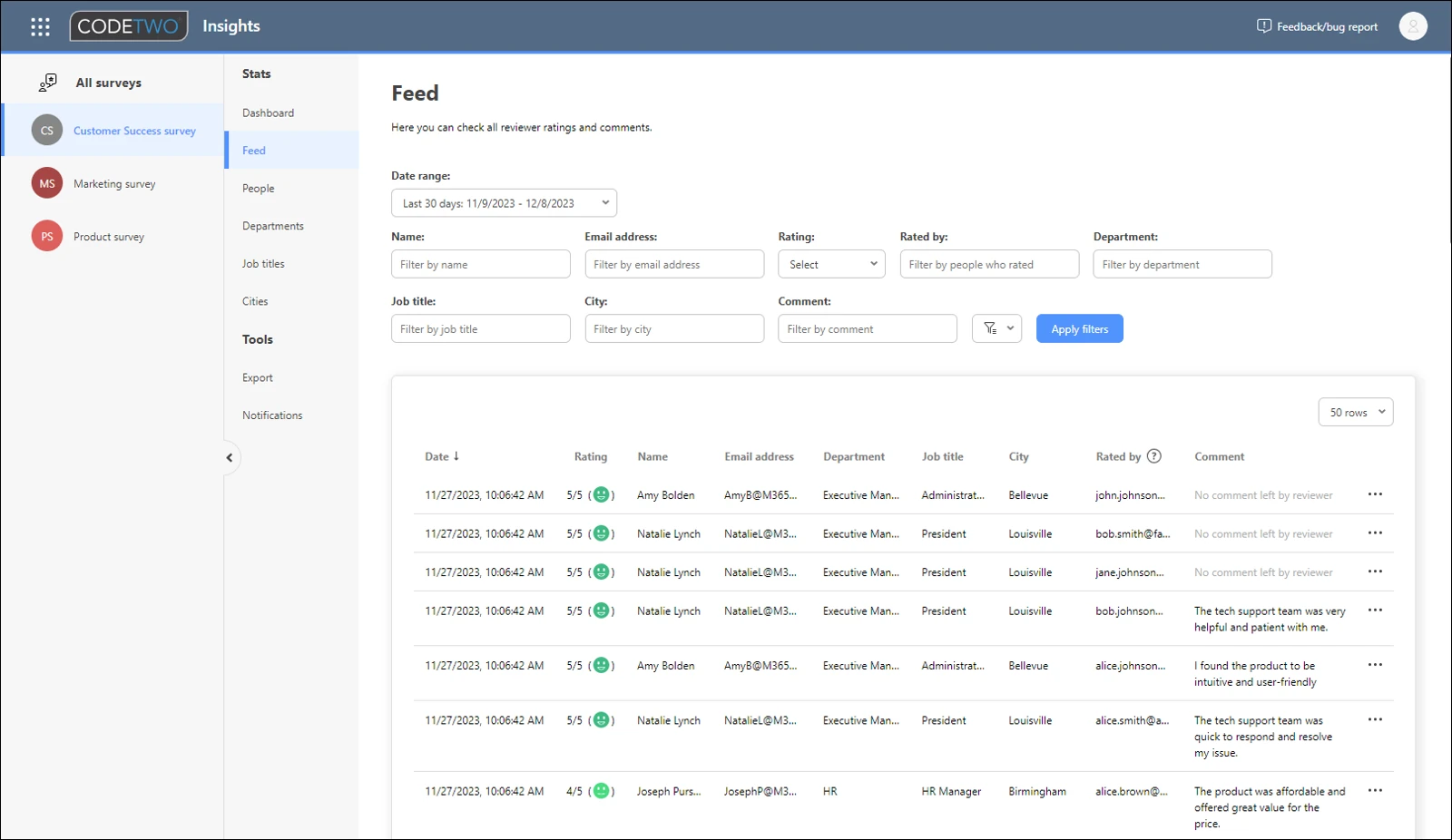
The Feed view combines ratings and comments with filters. Survey data can also be exported to a password-protected CSV download.

Use a regular review to identify repeated themes and decide which responses need follow-up. Agree who will handle a complaint, who will review a product suggestion and who can share useful positive feedback with the team.

If you export results for a service review, keep responsibility for the exported copy clear. The review process should account for both the report and any written feedback it contains.

CodeTwo Insights feed showing individual survey ratings and comments
Notifications

Bring feedback into your working routine.

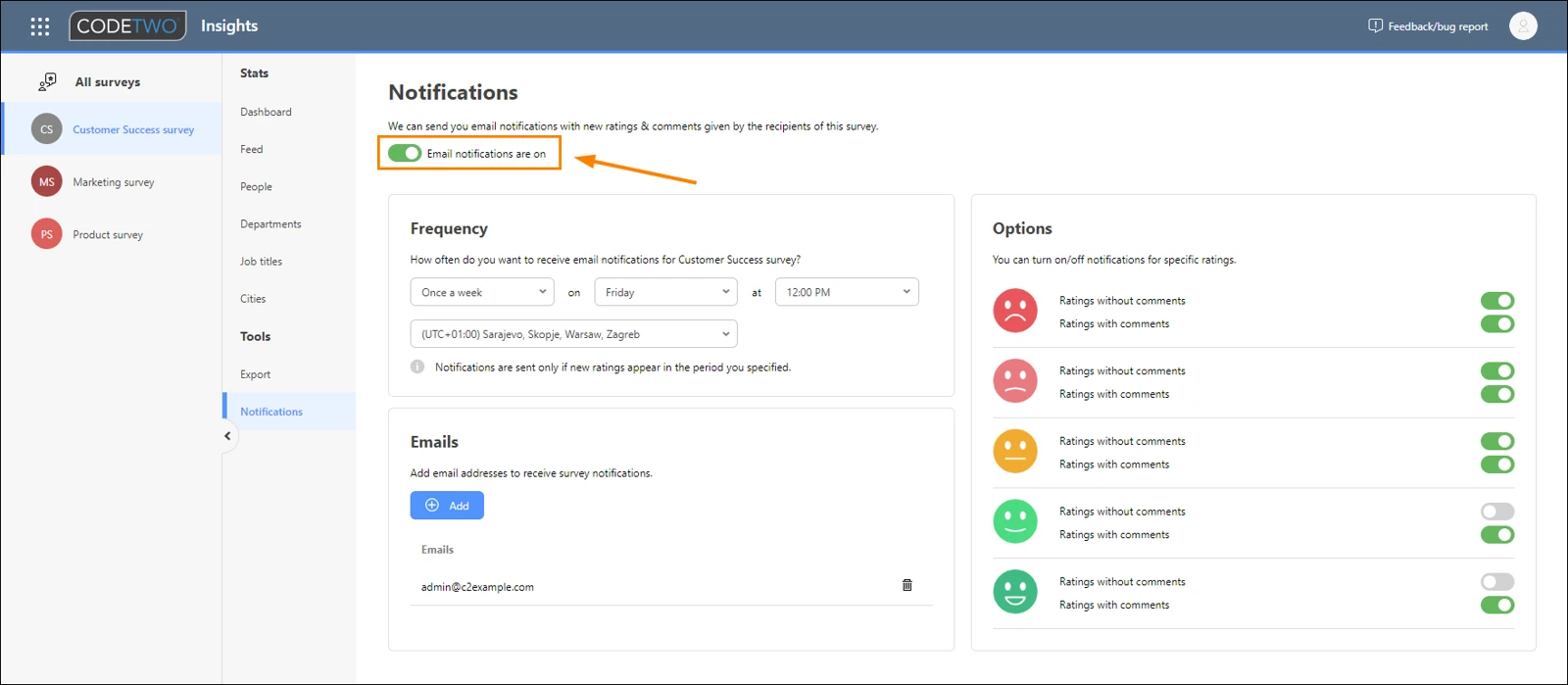
Configure email notifications for each survey, with hourly, daily, weekly or monthly delivery. Select the rating categories that should trigger a notification and whether comments matter to the selection. Up to five email addresses can receive the notification.

This gives teams a choice between frequent operational reviews and a periodic summary. For example, a service manager may want to hear about negative or neutral responses more frequently, while a wider review can look at longer-term trends.

Choose the recipients deliberately and agree who will act on what arrives. Notifications are most useful when they connect feedback to an owner and an established response process.

CodeTwo Insights notification schedule, recipient and rating options
Discuss your survey requirements
FAQ

Questions before you start.

Understand the recipient experience and decide how surveys should fit into your existing email workflow.

Is this a separate product or subscription?

One-click surveys is included in CodeTwo Email Signatures 365 at no additional feature charge. Nordma can help you add it to an existing deployment or scope a new one.

Does the customer have to complete a long questionnaire?

No. The initial response is a rating selected from the email. A thank-you page then gives the customer the option to add a comment, if enabled.

Can we add surveys only to selected messages?

Yes. Rules can target particular senders, recipients or, in cloud mode, keywords. Decide which point in the exchange should invite feedback, then configure the conditions around that decision.

Will surveys work when our team sends email from a phone?

Cloud-mode insertion does not depend on an individual email client. Outlook-mode insertion uses the CodeTwo add-in. Nordma can help test the applications and devices your team uses before rollout.

Can customers revise a rating, and how long is the survey active?

A survey in an email accepts one rating and remains active for three months. Another email is needed for a new rating.

Are there limitations with recipient identification?

Outlook-mode reviewers may appear as unknown. Messages addressed to several recipients do not reliably identify which recipient submitted the rating. Use individual-recipient messages when attribution matters.

Where is our survey data stored?

Survey data is stored in the Microsoft Azure region selected when your Microsoft 365 tenant was registered with CodeTwo. Nordma can help confirm the configured region and review the processing arrangements before you introduce customer or employee surveys.

Who can access survey ratings and comments?

Microsoft 365 global administrators have access to CodeTwo Insights by default. They can invite users or groups from the tenant. Invited users can view all surveys in the organisation, so access should reflect who needs to review customer and employee feedback. Invited users who are not global administrators cannot invite additional users.

What security assurances apply to One-click surveys?

Surveys are part of CodeTwo Email Signatures 365. The platform has Microsoft 365 certification, and CodeTwo’s information-security and cloud-privacy management system is certified against ISO/IEC 27001 and ISO/IEC 27018. See our Email Signatures security details for certification scopes, privacy commitments and additional framework information.

How should we choose our first survey?

Start with a specific interaction your team already wants to improve. Agree a clear question, the timing of the request and an owner for reviewing responses. Nordma can help turn those decisions into a pilot and a practical rollout plan.

Pricing enquiry

Included with Email Signatures 365.

One-click surveys is available to licensed CodeTwo Email Signatures 365 users without an additional surveys feature charge. It is not a separate free-standing subscription. The underlying email-signature subscription and any Nordma implementation services should be included in your budget.

Already using CodeTwo?

We can review your current signature setup, identify the teams that need surveys and scope configuration, design and reporting access. You can begin with a focused use case rather than redesigning every signature.

Starting with Microsoft 365?

The platform offers monthly or annual per-user licensing, with a minimum of 10 licences. We can confirm the licence count, operating mode and implementation scope for your organisation.

Evaluate before rollout

A 14-day trial is available. Agree which email clients, rating designs and reporting workflows you want to evaluate so the trial gives your team useful evidence for its decision.

A proposal with a clear scope.

Tell us your approximate user count, whether you already use CodeTwo, and the teams that will collect feedback. We can separate subscription costs from survey setup, testing, training and any ongoing assistance.

Request survey pricing

Explore the underlying signature platform.

See how centrally managed branding, directory-based personalisation and campaign rules work alongside surveys.

Explore Email Signatures